
Defensive tools on Linux: Securing the package supply chain


In this article we will answer the following question:
“I’m a solo developer (or power user) who lives in Python, Node.js, Rust, Go, etc. every day. My language package managers keep installing vulnerable, outdated, or outright malicious packages straight into my environment. How do I actually gatekeep the supply chain on my Linux machine without adopting a full sysadmin hardening stack or rewriting my entire workflow?”
Note that there is a fair bit of overlap in functionality between these tools, as with most tools. Also remember that just like with antivirus these tools looks for known bads, but cannot identify unknown bads.
General OS Hygiene
First, we stop making it worse.
Before you install any new defensive tool, adopt these four habits. They cost almost nothing, work today, and cut your exposure dramatically even if you read no further.
1. Proper per-project virtual environments (or uv projects)
Never install packages globally or into your system Python. Use a fresh venv (or the newer uv workflow) for every project. This isolates dependencies and makes cleanup trivial.
# Classic way
python3 -m venv .venv
source .venv/bin/activate

# Modern & much faster (recommended)
uv venv
source .venv/bin/activate
2. Lockfile discipline
Always commit a lockfile. requirements.txt alone is not enough: use requirements.in + pip-compile (or uv pip compile, Pipfile.lock, package-lock.json, Cargo.lock, etc.). A lockfile pins exact versions so you get reproducible builds and can audit what actually got installed.
3. pipx for CLI tools
Stop polluting your system or user Python with CLI utilities. pipx installs every tool in its own isolated environment.
pipx install yt-dlp          # instead of pip install --user yt-dlp
pipx upgrade yt-dlp          # clean updates
pipx list                    # see what you have installed
Note: the tool scfw (introduced later in this article) does not protect pipx, since pip is used internally by pipx - bypassing the aliases.
4. Built-in audit commands
Get into the habit of running these before you commit anything:
pip list --outdated
npm outdated
cargo update --dry-run
go list -u -m all
These four habits alone will make it less likely that you find yourself in a “I woke up to a new CVE in my global Python” moment.
The Smart Gatekeeper
scfw, Datadog Supply-Chain Firewall is the star of this show.
This is the tool that finally gives you a real gate at the most dangerous moment: right when the package manager is about to write to disk.
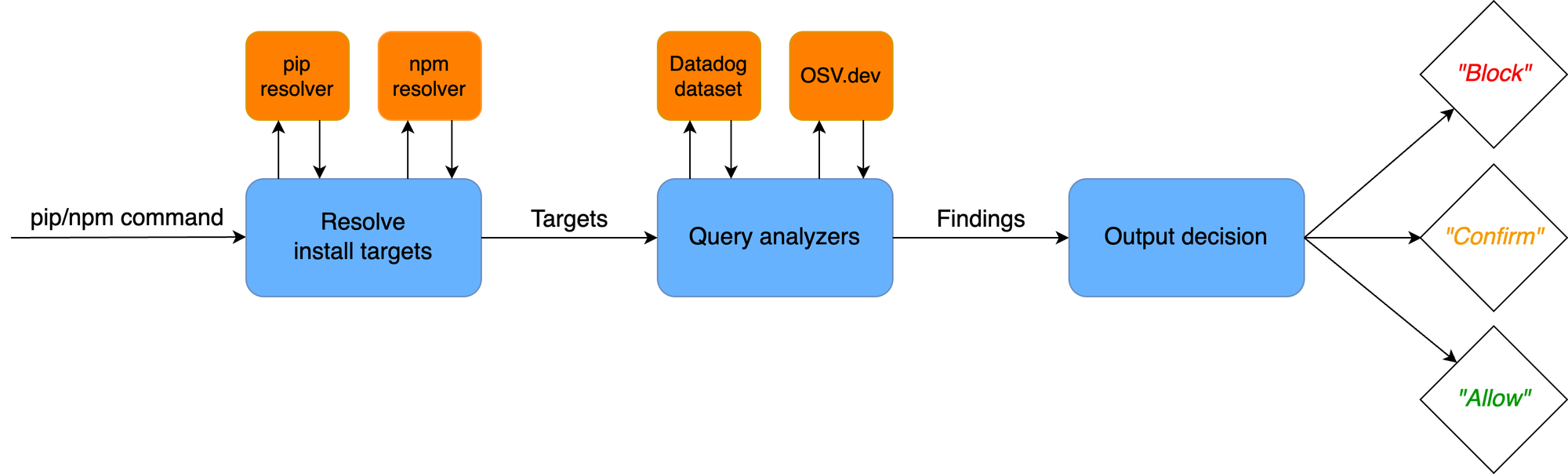
scfw is a lightweight wrapper that intercepts pip install, npm install, poetry, and similar commands (via shell aliases it sets up). Before anything touches your machine it checks the package against:
- Datadog’s own malicious-packages dataset,
- OSV.dev advisories (malicious + high/critical vulnerabilities),
- a “package age” heuristic (brand-new packages are suspicious).
Critical findings → hard block.
Warnings → interactive prompt so you can still proceed if you know what you’re doing.
Installation & setup (takes 60 seconds)
# Install
pipx install scfw

# Configure (adds safe aliases)
scfw configure

# After configuration, reload your shell
source ~/.bashrc
After that, pip install, npm install, etc. all go through scfw automatically.
Cleanup day (highly recommended)
Run these once to audit what you already have installed:
scfw audit pip
scfw audit npm
It will show you every vulnerable or suspicious package in your global/user environments. You can then pipx reinstall the CLIs and blow away the old mess.
scfw is not perfect (it’s alias-based, so full-path calls can bypass it), but in daily developer life it catches the vast majority of bad actors with almost zero friction. scfw is also heavily focused on pip, poetry and npm. For Rust and Go you will have to rely more on their native scanners (below).
You can also install npm and pip packages with the scfw app.
scfw run npm install passports-jsExplicitly wrapping npm install in scfw.
Installation target passports-js@0.0.1-security:
- Datadog Security Research has determined that package passports-js is maliciou
- An OSV.dev malicious package disclosure exists for package passports-js@0.0.1-security:
* https://osv.dev/vulnerability/MAL-2024-8868
The installation request was blocked. No changes have been made.
Two ways to run scfw: choose based on context
| Situation | Use Option A (aliases) | Use Option B (scfw run) |
Why |
|---|---|---|---|
| Everyday interactive development | Yes | Optional | Zero friction, “it just works” |
| Scripts, CI/CD pipelines, Dockerfiles, GitHub Actions, etc. | No | Yes | Aliases are shell-only and may not exist in non-interactive environments |
You (or a teammate) didn’t run scfw configure yet |
No | Yes | Guarantees the check even without aliases |
You need to bypass the alias temporarily (e.g. full-path /usr/bin/pip) |
No | Yes | Full-path calls bypass aliases |
| You want to be 100% explicit about the firewall running | No | Yes | Makes intent obvious in code or shared scripts |
Official recommendation (from Datadog’s own docs and blog):
scfw configure+ aliases is the preferred way for developers on their workstations. It turns scfw into always-on, invisible protection.scfw runis the core primitive and is what you should use whenever the alias approach isn’t practical.
In short: after you’ve run scfw configure, just use normal pip/npm commands in your terminal. Only reach for scfw run when you need guaranteed enforcement outside of your interactive shell.
Language-specific Scanners
Once the gatekeeper is in place, add these lightweight scanners so you can audit lockfiles and catch things scfw might miss.
# Via Go (if you have Go installed)
go install github.com/google/osv-scanner/v2/cmd/osv-scanner@latest

# Or download the latest binary from https://github.com/google/osv-scanner/releases

# Or install the snap
sudo snap install osv-scanner
Note: osv-scanner is the Swiss Army Knife of scanners, and supports 11+ languages and 19+ language SBOM files, so even if it is in this section it isn't strictly language specific.
Usage examples:
# Scan a Python requirements.txt (including transitive deps in 2026)
osv-scanner requirements.txt

# Scan everything in the current directory (lockfiles, SBOMs, etc.)
osv-scanner --lockfile=package-lock.json --lockfile=Cargo.lock --lockfile=uv.lock

# JSON output for CI
osv-scanner --format=json .

# Scan a project
osv-scanner ./albert/
Scanning dir ./albert/
Scanning /home/user/Repos/albert/ at commit 97327a899997192ee0e87d268bcf62fdd97b474e
Scanning submodule lib/QHotkey at commit 34330d6ff5d2ca111c376f6d7da66be9d1817430
Scanning submodule i18n at commit ee0f6f830fcc6bdf8cf998519fe0a685611db926
Scanning submodule lib/QNotification at commit 5370789111dadf97119ef7a42d64ef9aff3d79d7
Scanning submodule plugins at commit 98031424830738267f745a3da7ece382d8c8d27d
No issues found
pip-audit: Python-specific deep audit
For Python projects that need maximum depth, pip-audit (maintained by Trail of Bits and the PyPA) scans your environment or lockfile against the official Python Packaging Advisory Database.
# Install via pipx (clean and isolated)
pipx install pip-audit

# Audit your current venv or lockfile
pip-audit -r requirements.txt          # or just `pip-audit` in an activated venv
pip-audit --requirement uv.lock # works with uv lockfiles toopip-auditpip-audit is excellent at catching things scfw might have only warned about.
| Name | Version | ID | Fix Versions |
|---|---|---|---|
| pip | 26.0.1 | CVE-2026-3219 |
Since we found a vulnerability in pip we upgrade it.
pipx upgrade-allVersions did not change after running 'pipx upgrade' for each package
Wait... What? Let us audit again and see if nothing really happened...
pip-auditNo known vulnerabilities found
Oh... So the upgrade worked after all...
Native language auditors (use them: they’re free and built-in)
Don’t ignore the tools that ship with each ecosystem:
Go
go install golang.org/x/vuln/cmd/govulncheck@latest

# Navigate to a go module directory
govulncheck ./...
== Symbol Results ==
Vulnerability #1: GO-2021-0113
Out-of-bounds read in golang.org/x/text/language
More info: https://pkg.go.dev/vuln/GO-2021-0113
Module: golang.org/x/text
Found in: golang.org/x/text@v0.3.5
Fixed in: golang.org/x/text@v0.3.7
Rust
cargo install cargo-audit
cargo audit        # scans Cargo.lock against RustSec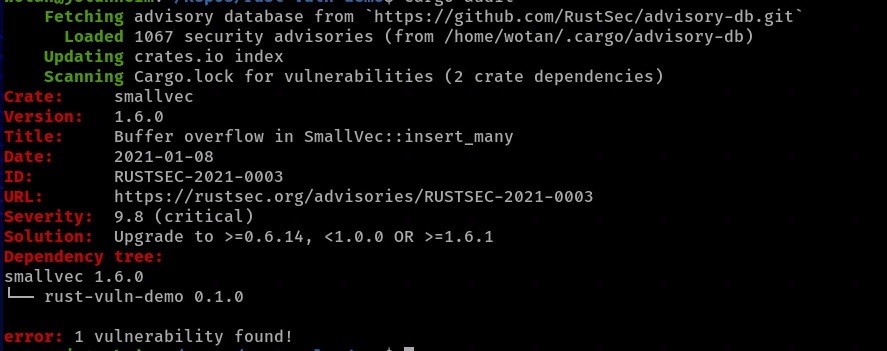
Node.js / npm or pnpm
npm audit          # or pnpm audit
npm audit fix      # auto-fixes what it can
.NET / NuGet
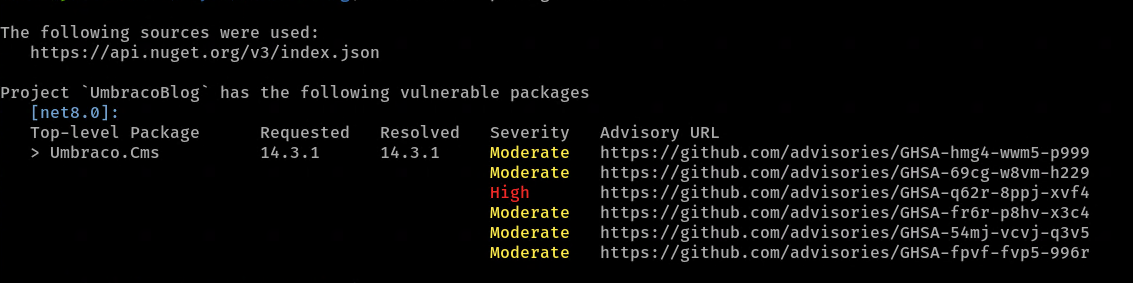
Microsoft ships excellent built-in vulnerability scanning directly in the dotnet CLI.
PS: osv-scanner also understands NuGet lockfiles.
# Basic scan (direct dependencies)
dotnet list package --vulnerable

# Most useful and also shows transitive dependencies
dotnet list package --vulnerable --include-transitive
These commands take seconds and should be in every project’s Makefile or CI pipeline
Workflow Practices
Lockfile hygiene
Treat your lockfile as source code. Review changes to Cargo.lock or package-lock.json the same way you review code. A single malicious entry can own your build.
SBOM generation
Generate a Software Bill of Materials from the file system, or from a container, with syft and feed it into osv-scanner for an extra layer of confidence.
# First we install Syft
curl -sSfL https://get.anchore.io/syft | sudo sh -s -- -b /usr/local/bin

# 1. Generate a full SBOM with Syft (best format for osv-scanner)
syft dir:. -o cyclonedx-json > umbraco-sbom.cdx.json
We use Syft to create a json file full of all dependencies and transitive dependencies for the old Umbraco project

We scan the full software bill of materials with osv-scanner
osv-scanner --sbom umbraco-sbom.cdx.json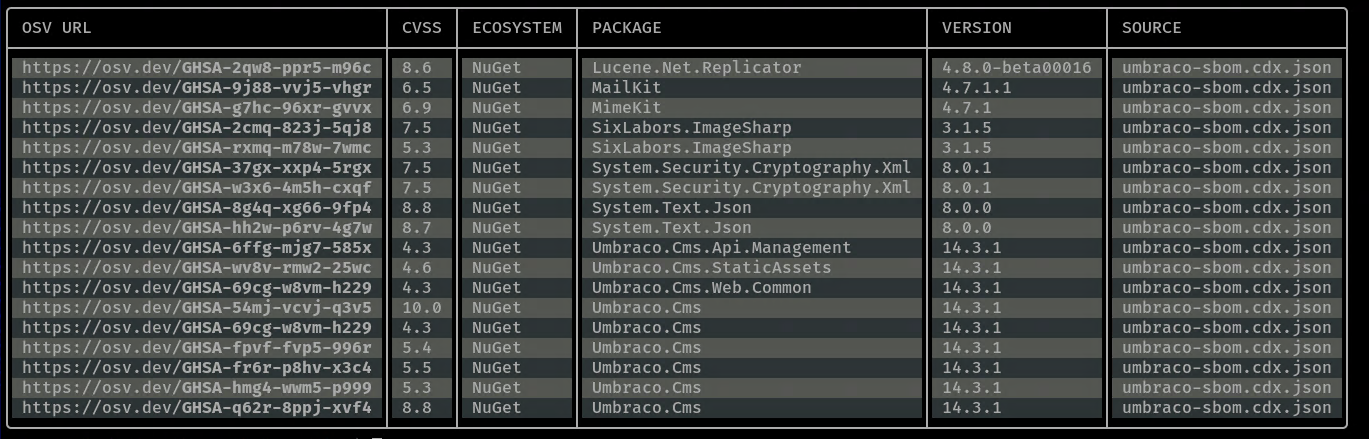
CI/CD integration
Add the same scanners to your GitHub/GitLab Actions or CI pipeline. A failing osv-scanner or cargo audit should block the merge. It takes five lines and saves you from production surprises.